Mister Popper Stopper2.1
Publisher Description
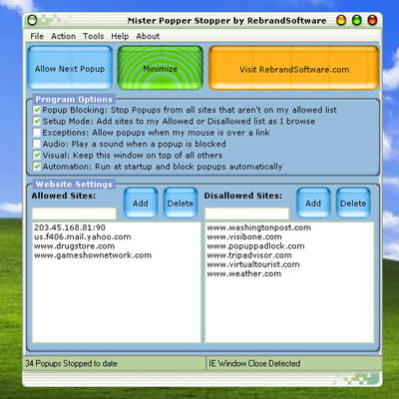
This popup stopper software monitors all open IE windows for popups.
Unique "Setup Mode" notifies you whenever a site tries to send a popup, and lets you block it or allow it with the click of a button.
Once you turn off Setup Mode, only popups from sites you have specifically allowed will be shown.
Unique "Setup Mode" notifies you when a site tries to open a popup and lets you choose whether to allow or permanently block popups from that site.
Press Win+Z to allow the next popup.
Can sense when your mouse is over a link and allow popups that are the results of clicking a link that opens in a new window.
Play a sound whenever a popup is blocked.
Can be set to run at startup.
Minimizes to the System Tray and blocks popups without interfering with your browsing.
Click the System Tray icon to make the program visible, allow the next popup, or exit the program.
Can be added to Internet Explorer's "Tools" menu for quick and easy access!
Does not Contain any Adware, Spyware, or other Third Party Software.
A brandable (a.k.a. Private Label) version of this software, with full resell rights, is available at www.rebrandsoftware.com.
About Mister Popper Stopper
This Ad Blockers program is available in English. It was last updated on 13 October, 2026. Mister Popper Stopper is compatible with the following operating systems: Windows, Windows-mobile.
The company that develops Mister Popper Stopper is Rebrand Software, LLC. The latest version released by its developer is 2.1. This version was rated by 1 users of our site and has an average rating of 4.0.
The download we have available for Mister Popper Stopper has a file size of 2.1 MB. Just click the green Download button above to start the downloading process. The program is listed on our website since 2008-12-16 and was downloaded 307 times. We have already checked if the download link is safe, however for your own protection we recommend that you scan the downloaded software with your antivirus. Your antivirus may detect the Mister Popper Stopper as malware if the download link is broken.
How to install Mister Popper Stopper on your Windows device:
- Click on the Download button on our website. This will start the download from the website of the developer.
- Once the Mister Popper Stopper is downloaded click on it to start the setup process (assuming you are on a desktop computer).
- When the installation is finished you should be able to see and run the program.
Program Details
System requirements
Download information
Pricing
Version History
version 2.1
posted on 2008-12-16
New GUI, Improved Layout, Other
